Google Tasks apps for Mac
Google doesn't make a Google Tasks app for Mac. The Mac apps that sync with Google Tasks come from other developers: Sidekick, KiteTasks, Google Tasks Client and gTasks are native Mac apps, and TasksBoard is a web app you install from your browser. They differ mostly in where your list sits on screen and how recently they were updated.
Last updated
The apps, compared
Described from each app’s own listing as it read on 19 November 2026. Prices are US prices.
| App | Where your list is | Google accounts | Price | Needs | Last updated |
|---|---|---|---|---|---|
| Sidekick | Floating over your other apps | One free, more with Premium | Free forever, or Premium for $9 once | macOS 15 or later | Arrives 1 December 2026 |
| KiteTasks | Menu bar and a window | Several | Free to download, with a $9.99 Lifetime License in the app. Its website says it’s free during its beta | macOS 14.6 or later | November 2026 |
| Google Tasks Client - To-Do | Menu bar and a window | Any number | $6.99 | macOS 10.11 or later | December 2022 |
| gTasks | A window | 2 free | Free for 2 lists per account and 7 tasks per list; $9.99 for unlimited tasks | macOS 10.14 or later | December 2022 |
| TasksBoard | A board, in the browser or installed from it | One | Free, with paid plans from $4.79 a month, billed yearly | A browser | A web app, updated by its maker |
Sidekick
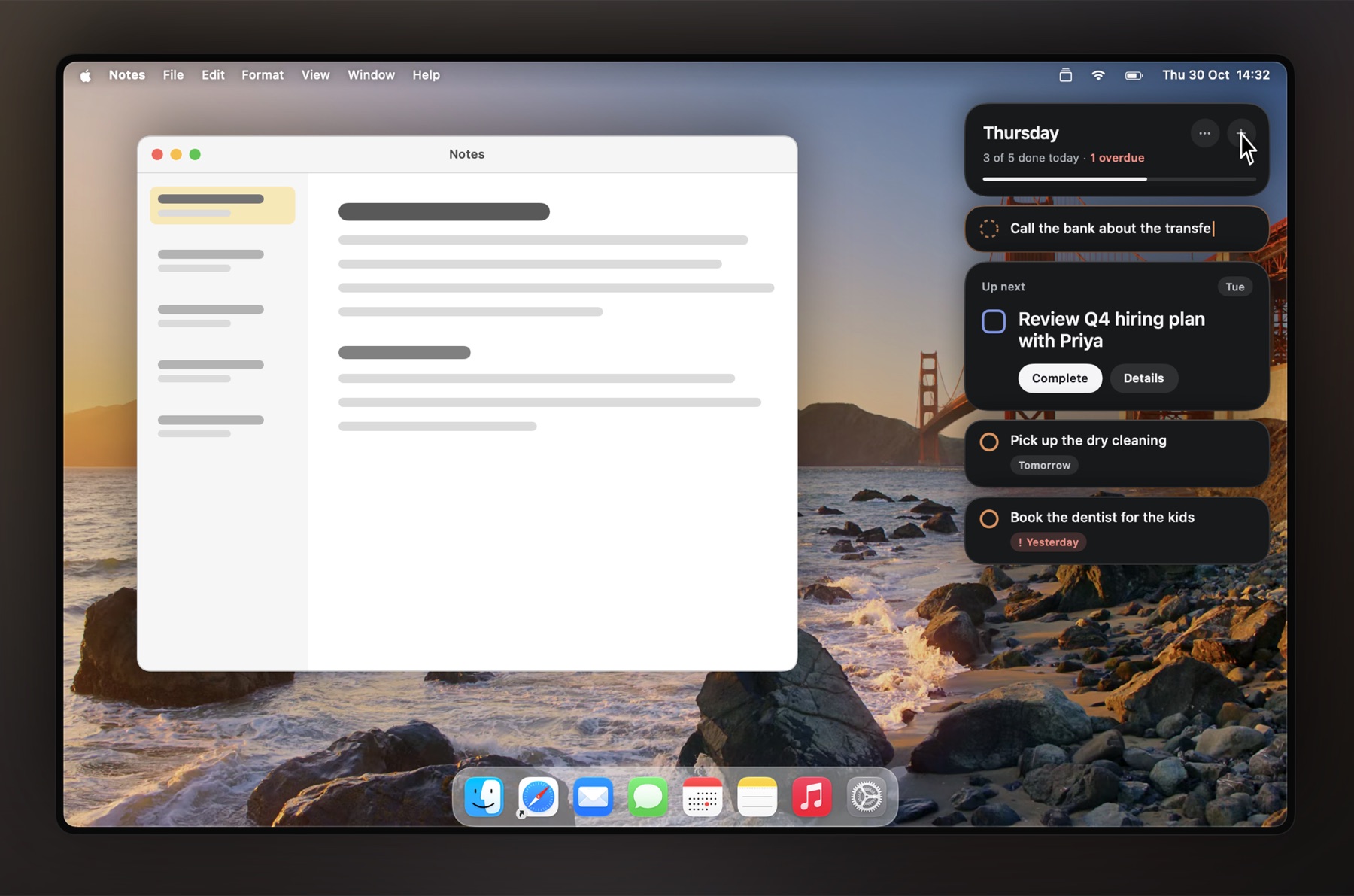
Sidekick is ours, so read this part knowing that. It shows your Google Tasks as cards that float over whatever you’re working on, so the list stays in sight without switching windows. You tick tasks off, reorder them and add new ones right there, and ⌃⌥N takes a new task from any app.
Choose it if you want your list visible all day. Skip it if you want a regular window you open and close, or you’re on a Mac older than macOS 15. It arrives in the Mac App Store on 1 December; pricing has what the free plan includes.
KiteTasks
A native Mac app by Arturo Arranz Mateo. Its listing describes a menu bar list, keyboard shortcuts, notifications, several Google accounts you switch between in a click, and changes that queue while you’re offline and sync when you’re back.
Choose it if you want a full Mac app with a menu bar list and it’s actively updated. Check first: its price. The App Store shows a $9.99 Lifetime License, and its own website says every feature is free during its beta, with a price to come.
Google Tasks Client - To-Do
A Mac app by Naoki Otsu. Its listing describes a menu bar icon, any number of Google accounts with one-click switching, and sync with Google Tasks and Google Calendar.
Choose it if you want a paid-once app with several accounts. Check first: the Mac App Store showed its latest version as December 2022.
gTasks
A Mac app by JulyApps Ltd, with matching apps for iPhone and iPad. Its listing says it keeps working without a connection and syncs when one is available. The free version allows 2 accounts, 2 lists per account and 7 tasks per list; unlimited tasks cost $9.99, as a purchase in the app or as the separate gTasks Pro.
Choose it if you want the same app on Mac, iPhone and iPad. Check first: the Mac App Store showed its latest version as December 2022.
TasksBoard
A web app that shows your Google Tasks lists side by side as a board, with sharing on its paid plans. There’s no installer for the Mac: you open it in Chrome, Edge or Safari and install it from the browser, the same way you can install Google’s own tasks.google.com.
Choose it if you think in columns and want every list on one screen. Skip it if you want a native Mac app.
One more, for a different job
ReminderBridge (Aeriform, $7.99 once) doesn’t show your tasks itself. It syncs the Google Tasks lists you choose with Apple’s Reminders app on the Mac. The Google Tasks and Apple Reminders guide covers that route.
Or no app at all
Google’s own website is free and has every Google Tasks feature. Installed from Chrome, Safari or Edge, it gets its own window and Dock icon. The Google Tasks for Mac guide has the steps and compares it with the side panel in Gmail and Google Calendar.
How to choose
Start from where you want the list to be. Floating over your work all day: Sidekick. In the menu bar, a click away: KiteTasks or Google Tasks Client. A board of columns: TasksBoard. The same app on your Apple devices: gTasks. Then check two things on the app’s listing: when it was last updated, and what it asks Google for when you sign in.
Questions
What is the best Google Tasks app for Mac?
It depends on where you want your list. For a list that floats over your other apps, Sidekick. For a list that drops down from the menu bar, KiteTasks or Google Tasks Client. For a board with columns, TasksBoard. If you only check tasks a few times a day, Google's own website installed as a web app is free and enough.
Is there an official Google Tasks app for Mac?
No. Google makes Google Tasks apps for iPhone, iPad and Android only. Every Mac app for Google Tasks is made by another developer and connects to your Google account through Google's sign-in.
What is Google Tasks Client?
Google Tasks Client - To-Do is a Mac app by Naoki Otsu, sold on the Mac App Store, where it was listed at $6.99 on 19 November 2026. It isn't made by Google. Its listing describes a menu bar icon and any number of Google accounts.
gTasks vs Google Tasks: what's the difference?
Google Tasks is Google's own task list, which on a Mac runs in the browser. gTasks is an app from JulyApps Ltd that syncs with it, with apps for Mac, iPhone and iPad. Tasks you add in gTasks appear in Google Tasks, because they are stored in your Google account.
Do these apps change my tasks in Google?
Yes, that's how they sync: a task you add, edit or tick off in the app is changed in your Google account, so it shows up in Google Tasks on your phone and in Gmail too.
Is it safe to sign in to a Google Tasks app with my Google account?
Sign in only on Google's own page, and read what the app asks for. An app for Google Tasks needs your tasks and little else. You can remove any app's access later in your Google Account, where it lists the apps that have access.