
Google Tasks and Google Calendar: what shows where
Google Calendar shows every task that has a date: in the all-day row if it has no time, on the grid if it has one, and a deadline as a separate Due chip on its own day. The Tasks list is the only place for tasks with no date, but it holds just the current occurrence of a repeating task; the later ones are on Calendar until their day comes. A task made in Calendar goes to whichever list is selected in its box, which starts on your default list.
Last updated
The Tasks list and Google Calendar show the same tasks, and they disagree about which ones to show. Calendar shows anything with a date, including the later occurrences of a repeating task and a deadline on its own day. The list shows tasks without dates, which Calendar can’t, and only one occurrence of a repeating task at a time. If something seems to be missing, it’s almost always one of those two cases.
I set up a week of ordinary tasks in a test list, some in the Tasks app and one from Calendar, and looked at each in both places.
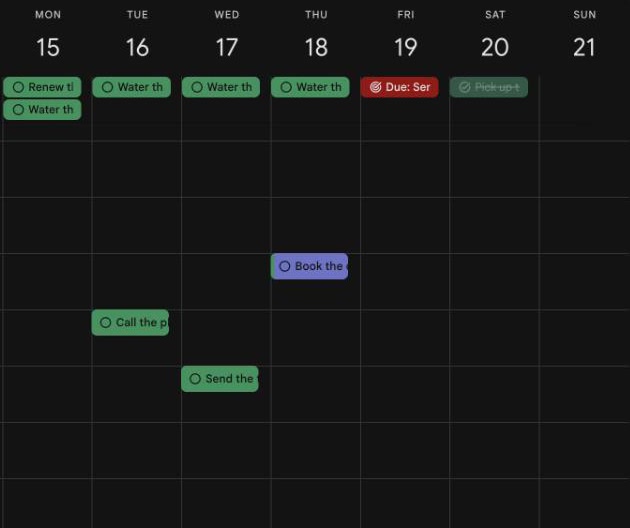
The same week in both views
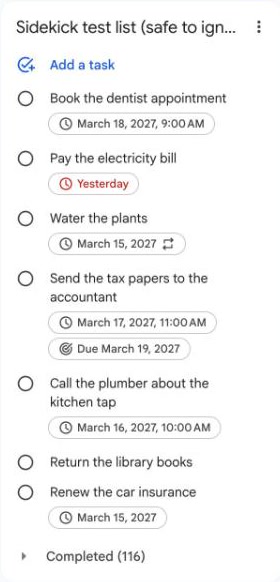
The list had eight tasks: one with no date, one with a date, one with a date and a time, one with a date, time and deadline, one that repeats daily four times, one I’d already done, one that was a day overdue, and one I made in Calendar.
| The task | In the Tasks list | On Google Calendar |
|---|---|---|
| No date | Shown | Nowhere |
| A date, no time | Shown with the date | In the all-day row of that day |
| A date and a time | Shown with the date and time | On the grid at that time |
| A date, time and deadline | One entry with two labels | At its time, and as a red “Due” chip in the deadline day’s all-day row |
| Repeats daily, four times | One entry, the current day’s | All four, one on each day |
| Made in Calendar, 9:00 to 9:30 | Shown with the start time only | On the grid, in a different colour from the others |
| Completed | Moved under Completed | Still on its day, struck through |
| Overdue | In its place, with a red “Yesterday” | Still on its day, and counted in a “pending” chip on today |
Repeating tasks: one in the list, the rest on the calendar
This is the case that makes people think a task has vanished. I made “Water the plants” repeat every day, four times, starting on a Monday. The list showed one task, Monday’s, with a repeat symbol beside the date. Calendar showed it on Monday, Tuesday, Wednesday and Thursday.
Then I ticked Monday’s in the list. Google said “Task completed and will reappear on its next scheduled day”, and the task left the list. Tuesday’s was nowhere in the list. On Calendar, Monday’s was struck through and the other three were still there.
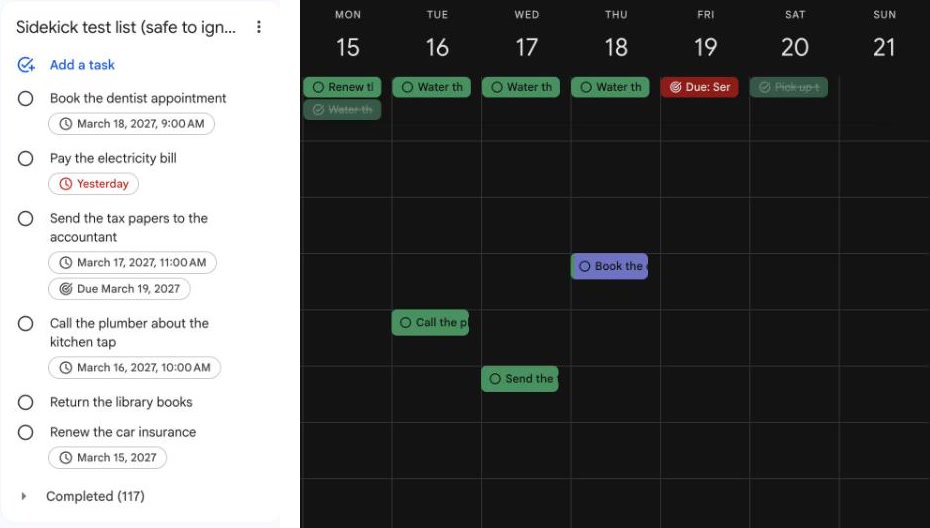
Google’s help describes the same thing: the next occurrence “appears in your task list on the date specified”. Each occurrence on Calendar has its own Mark completed button, and I could tick off Tuesday’s, Wednesday’s and Thursday’s on Monday.
So if you plan your week from the list, a repeating task you’ve done today won’t remind you that it comes back tomorrow. Calendar will. The same help page adds that Calendar shows only “a limited number” of coming occurrences and adds more as time passes, that a repeating task can’t be moved to another list, and that deleting one occurrence while keeping the rest can only be done in Calendar.
A task made in Calendar
In Calendar, Create, then Task, opens a box with a date, a start and end time, a repeat menu, a deadline, a description and a list menu.
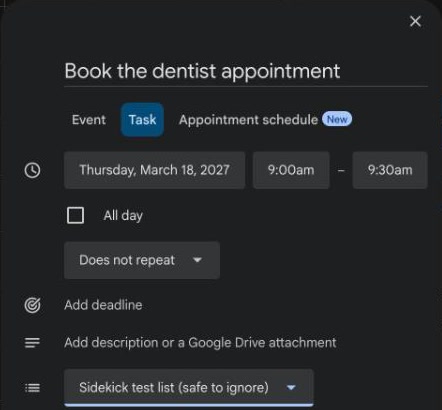
The box opened half an hour long, starting at the next half hour, and its list menu was set to the first list in my sidebar. I had been adding tasks to a different list all afternoon; Calendar didn’t follow. Had I saved without looking, the dentist appointment would have gone into my default list. The menu lists every list you have, so it takes one click to change, but nothing draws your eye to it.
The task Calendar made also differs from one made in the list. Its details in Calendar read “9:00 – 9:30am”, with a calendar, Free and Private under them. The plumber call I timed from the list showed “10:00am” and an “Add end time” link, so it had no length until I gave it one. In the Tasks list both looked the same, a date and a start time.
A date and a deadline
A Google task can now have two days: when you plan to do it and when it must be done. I planned the tax papers for Wednesday at 11:00 and gave them a deadline of Friday, from the task’s menu in the list. The deadline picker suggested Thursday, the day after the planned date, and I moved it on a day.
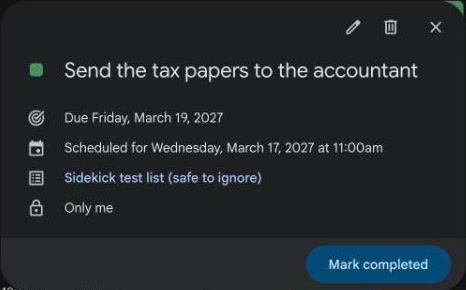
The list showed one task with two labels, the date and time, and “Due March 19, 2027” under it. Calendar put it on the grid at 11:00 on Wednesday and again as a red “Due:” chip at the top of Friday. If you only ever set one date, nothing changes for you. If you plan Tuesday and owe Friday, Calendar is where both are visible at a glance.
Finished and overdue tasks
The dry cleaning, which I ticked off in the list, stayed on Saturday in Calendar, struck through. The list moved it under Completed, folded away.
The overdue task, “Pay the electricity bill”, dated the day before, showed in the list with a red “Yesterday”. On Calendar it stayed on yesterday’s date, and today also had a chip reading “3 pending”. It opens a panel titled Pending tasks, “In the past 365 days”, where I could complete each one. It counted overdue tasks from every list I have, not just the test list. I’ve written about clearing that pile separately.
What each view lets you change
Both let you change the title, date and time, the deadline, the notes and the list, and both let you complete a task. In the list, a task’s menu also has Add to Starred, Add a subtask and Add attachment. Calendar’s edit box had none of those, but it lets you give a timed task an end time, which the list doesn’t.
When Google notifies you
Google’s help says a task with a date and time notifies you at that time, a task with only a date at 9 AM, and a deadline at 9 AM on the deadline day, in your local time.
Outside Google’s own apps
Any app that isn’t Google’s reads your tasks through Google’s Tasks API, and gets less than either view. The API reference gives a task one date field, due, which it describes as the scheduled date and says doesn’t represent the deadline. The same page says the time a task is scheduled for can’t be read or written through the API. There is no field for the deadline, the end time or the repeat. Sidekick reads Google Tasks through that API, so it works from the same single date.
What I’d do with this
Capture in the Tasks list, because it’s quick and it’s the only home for a task without a date. Plan the week in Calendar, because it’s the only view that shows repeats before their day, deadlines on the day they fall and what you’ve already done. When you make a task in Calendar, look at the list menu before you save. And if a repeating task matters to how you plan, don’t trust the list to show it until the morning it’s due.
Questions
Why is my task not showing in Google Calendar?
Most often because it has no date. Calendar places a task on a day, so a task without one has nowhere to go and stays in the Tasks list only. Give it a date, with or without a time, and it appears on that day.
Why did my repeating task disappear from Google Tasks after I completed it?
The Tasks list holds one occurrence of a repeating task at a time. When you complete it, Google says it will reappear on its next scheduled day, and until then the list doesn't show it. Google Calendar shows the coming occurrences in the meantime, and you can complete them there early.
Which list does a task made in Google Calendar go to?
The one selected in the list menu of Calendar's task box when you save. The box starts on your default list, not the list you last used, so check that menu before saving.
What is the difference between a task's date and its deadline?
The date, with an optional time, is when you plan to do the task. The deadline is the day it has to be done. A task with both shows two labels in the Tasks list, and on Google Calendar it sits at its planned time and again as a red Due chip on the deadline day.
Do overdue tasks stay on the day I missed in Google Calendar?
Yes. An overdue task stays on its original day, and Calendar also counts it in a pending tasks chip at the top of today, which gathers unfinished tasks from the past 365 days across all your lists.
When does Google notify me about a task?
Google's help says a task with a time notifies you at that time, a task with only a date at 9 AM, and a deadline at 9 AM on the deadline day.